Why I Built Verbark, My Own App for Learning Swedish Verbs
I needed every form of the Swedish verbs I use every day, in one list I could print and practise on paper. No app did that, so I built one myself, in native Swift.
Living in Sweden means learning Swedish, and learning Swedish means learning verbs. Lots of them, in lots of forms.
Every Swedish verb has an infinitive, a present tense, a past tense, a supine, an imperative and a couple of participles. Then come the compound tenses and the passive forms. And to know how a verb changes, you first need to know which of the verb groups it belongs to. Skriva becomes skriver, skrev and skrivit. Prata becomes pratar, pratade and pratat. You can't guess this. You have to practise until it becomes automatic.
What I actually needed
My wish list was short:
- Every form of a verb on one screen, so I didn't have to work out the forms or look them up in three different places.
- A list of favourites: the verbs I really use every day at work, in shops and with neighbours, separate from the thousands I might never need.
- A way to print that list. I learn best with pen and paper. I wanted a sheet I could cover with my hand, fill in and check against the answers.
That last point turned out to be the hard one.
Nothing did all three
I tried dictionaries, websites and plenty of language apps. Some showed the verb forms well but didn't let me save my own list. Others had flashcards but kept them locked inside the app. None of them could take my everyday verbs and turn them into something I could print and practise away from a screen.
So I did what developers tend to do when a tool doesn't exist: I built it.
Meet Verbark
Verbark is a Swedish verb bank for iPhone and iPad with more than 4,700 verbs. It's free, has no ads and no account, and works completely offline.
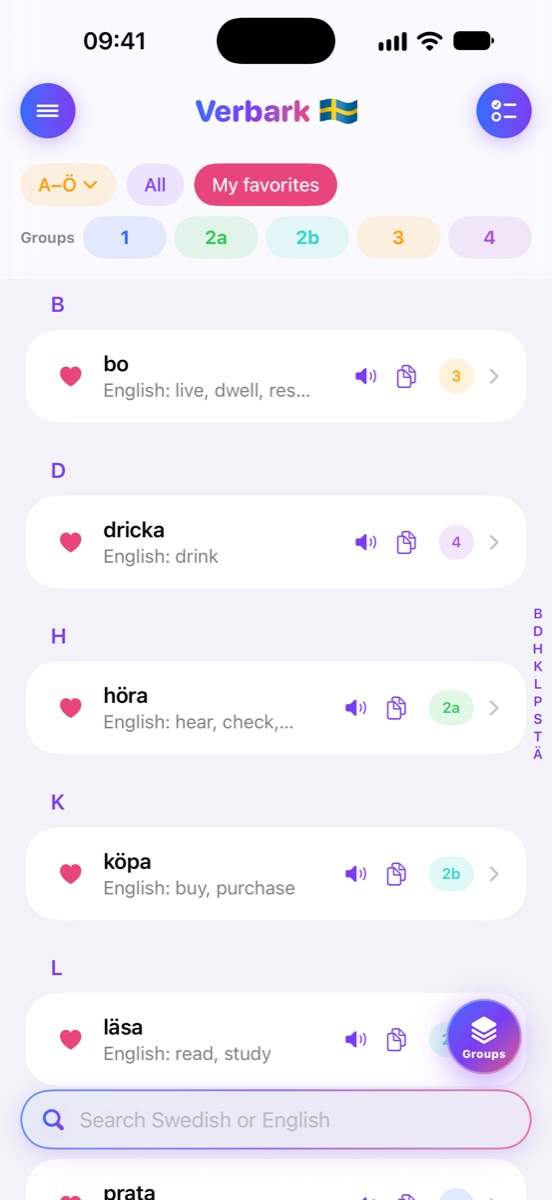
The main screen is a list of verbs, each colour-coded by its verb group. You can search in Swedish or English, and even search by a conjugated form: type skrev and it finds skriva. A tap on the heart adds a verb to your favourites.
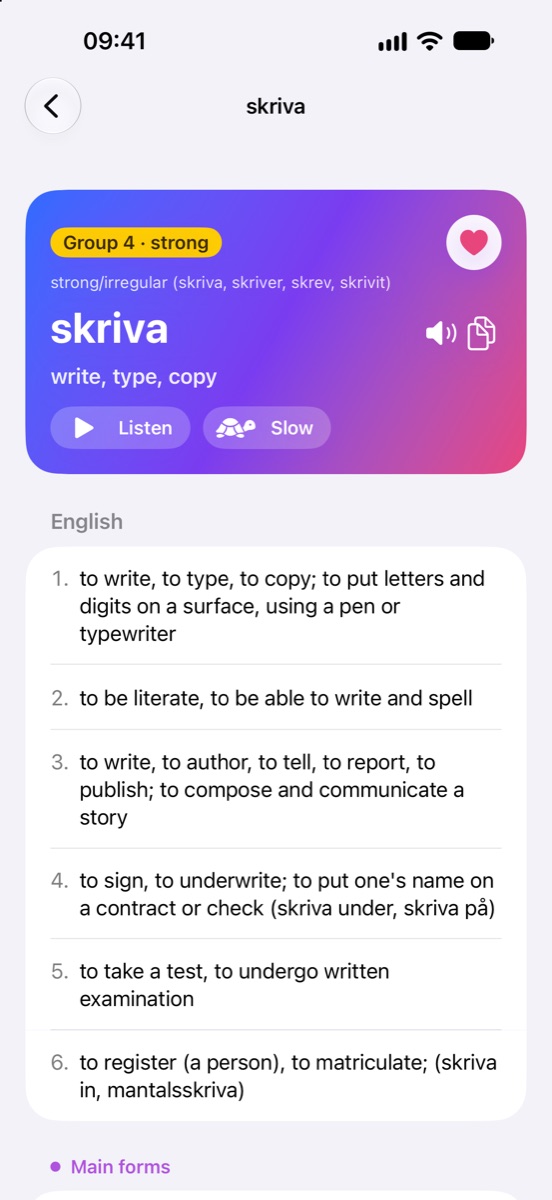
Each verb has its own page with the meaning, the verb group and every form, from the infinitive to the passive. You can listen to any word in Swedish, at normal or slow speed, using Apple's built-in voices on the device.
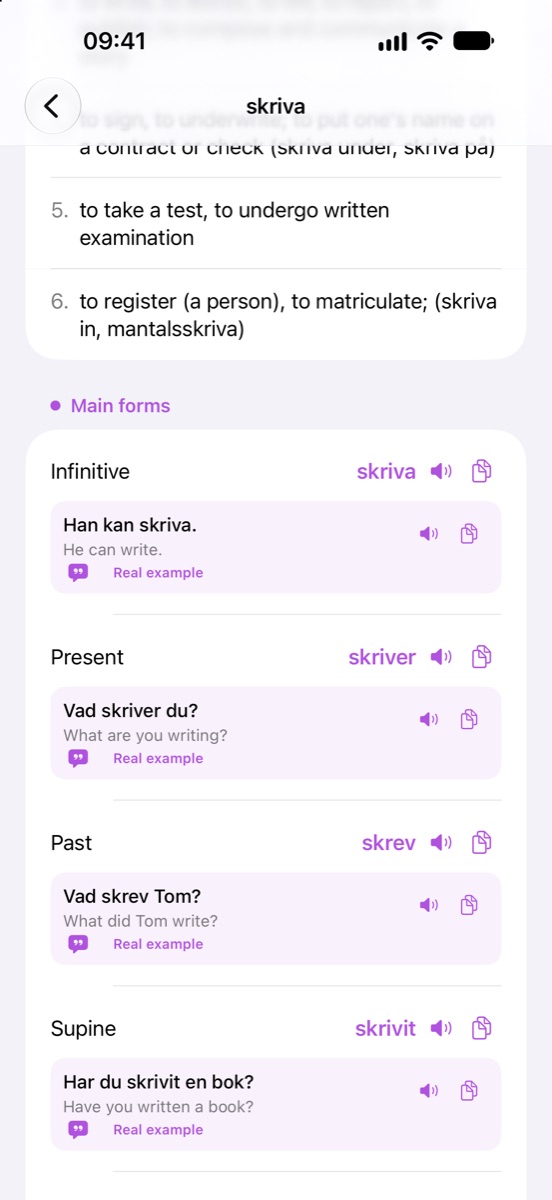
Seeing a form in a table is one thing. Seeing it in a real sentence is what makes it stick. Every form comes with an example sentence and an English translation, and more than 3,000 of them are real sentences written by people, from the Tatoeba project.
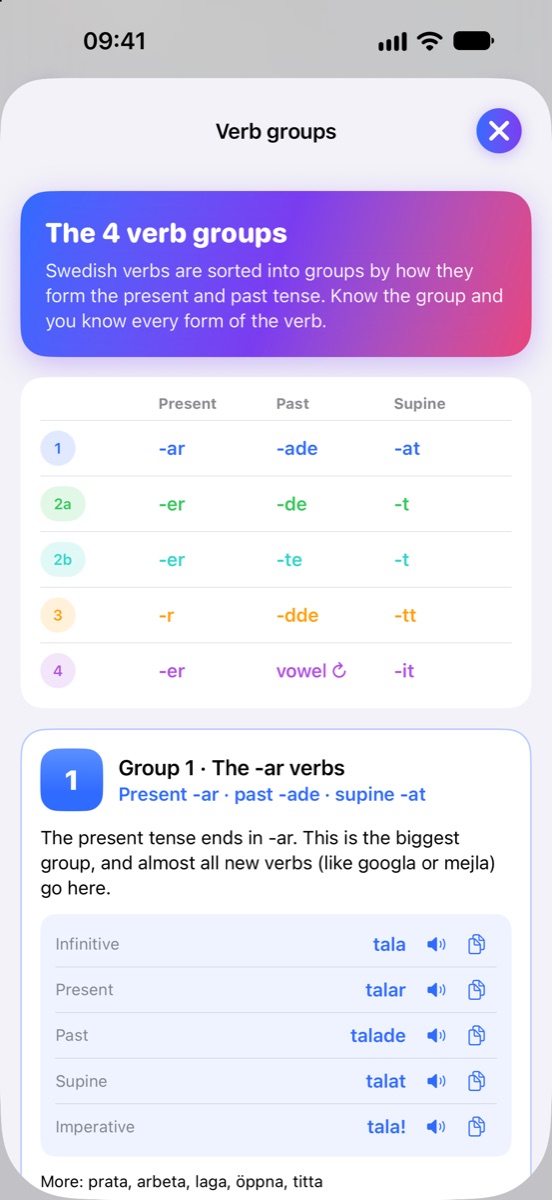
If you're unsure why a verb behaves the way it does, there's a built-in guide to groups 1, 2a, 2b, 3 and 4 and the endings each of them uses.
The part I built it for: printing
This is the feature I was missing everywhere else. Pick your favourite verbs, choose a layout, and Verbark creates a PDF you can print or share.
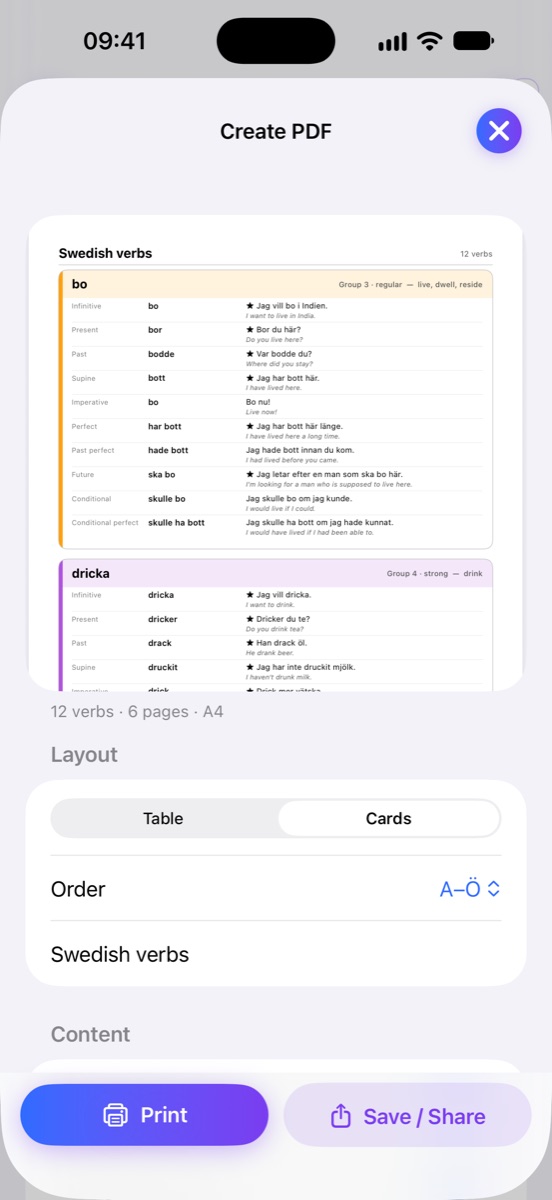
There are several kinds of sheet:
- Tables with every form of each verb
- Cut-out flashcards to practise anywhere
- Study cards with example sentences
- Fill-in practice sheets with an answer key
Now I keep a printed sheet of my everyday verbs in my bag, and I practise on the train. That was the whole point.
Why I chose native iOS
In my day job I'm a Flutter developer. Flutter would have been the quickest way to build this app, and it would have given me an Android version for free.
I chose native Swift on purpose. I wanted a real project to sharpen my native iOS skills, not just another tutorial. Flutter lets you skip much of the platform, but a native app makes you face it directly: how iOS apps are put together, how the system frameworks work, how speech, PDFs and printing are done the Apple way, and how to make an app feel truly at home on iPhone and iPad.
A side project is the perfect place to learn this. There's no deadline and no client, and I'm the user, so I know exactly when something feels wrong. Every rough edge I found taught me something, and that knowledge makes me a better mobile developer, including in Flutter, where I sometimes need to write native iOS code anyway.
What I learned
- Build what you need yourself. When you're your own user, you never have to guess what's important. My wish list became the feature list.
- Good data is half the app. The verb forms come from SALDO by Språkbanken and English Wiktionary, and the example sentences from Tatoeba. Putting those open sources together into something clean and searchable took as much work as the user interface.
- Offline and private is a feature. No account, no tracking and no internet connection needed. It kept the app simple and makes it easy to trust.
- Paper still matters. In a world of apps, the feature people (and I) love most is the one that ends with a printer.
Try it
Verbark is now on the App Store. If you're learning Swedish, whether for SFI, a course, a trip or a new life in Sweden, I hope it helps you as much as it helps me.
Lycka till med verben!
Written by
Niluka Bandara
Lead Mobile Developer in Stockholm, building Flutter apps for fintech and payments.